

Otter
I waddled onto the beach and stole found a computer to use.
🍁⚕️ 💽
Note: I’m moderating a handful of communities in more of a caretaker role. If you want to take one on, send me a message and I’ll share more info :)
- 54 Posts
- 82 Comments
 8·14 days ago
Your account is marked as a bot, you can change that toggle in your account settings


 4·28 days ago
I think the website is old, and the blurry bits were a prediction
The new cycle is expected to start late in 2019 or in 2020, with solar maximum to be reached between 2023 and 2026 and the maximum (smoothed) sunspot number in the 95 to 130 range.
A different color and a legend would have been nicer imo
Appreciate the write-up, thanks!
I found this diagram, and this should mean that the levels will drop by around 2030?


You mentioned being frustrated at Plausible. What did you not like about it?
I haven’t tried Plausible, but it seemed popular
Sounds like they joined a large group chat as a member
The FBI, the documents show, gained access to conversations in a “courtwatch” Signal group that helps coordinate volunteer activists who monitor public proceedings at three New York federal immigration courts. The US government has repeatedly been accused of violating immigrants’ due process rights at those courts.
While I don’t have a direct answer, I know that my university had some courses dedicated to this topic. I think these are some of them:
https://www.students.cs.ubc.ca/~cs-311/2025W1/nav/goals.html
https://www.cs.ubc.ca/course-section/cpsc-411-201-2020w
https://www.cs.ubc.ca/~rxg/cpsc509-spring-2024/
The second one is described as
The goal of this course is to give students experience designing, implementing, and extending programming languages. Students will start from a machine language, the x86-64 CPU instruction set with Linux system calls (x64), and incrementally build a compiler for a subset of Racket to this machine language. In the process, students will practice building, extending, and maintaining a complex piece of software, and practice creating, enforcing, and exploiting abstractions formalized in programming languages.
The course assumes familiarity with basic functional programming in Racket, and some simple imperative programming in assembly.
Those links might give you something to search off of?
And what’s the purpose of developing more languages anyway?
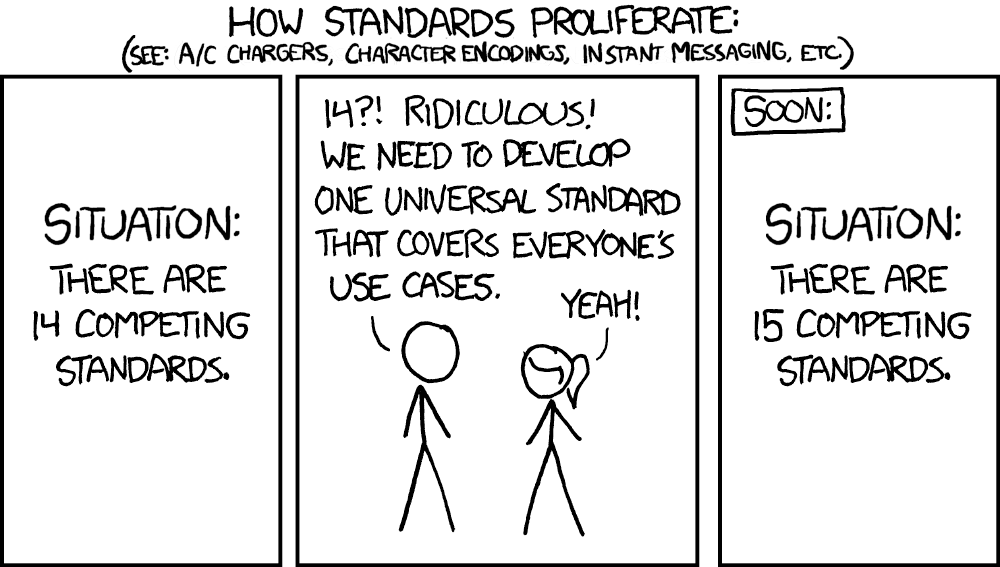
At some level, I think it’s this:
Looks good!
I have one suggestion, the white text on bright green on the website is hard to read. Maybe you can pick different colors, or put borders around the characters.
Linux Foundation
The slide people are mentioning
In text:
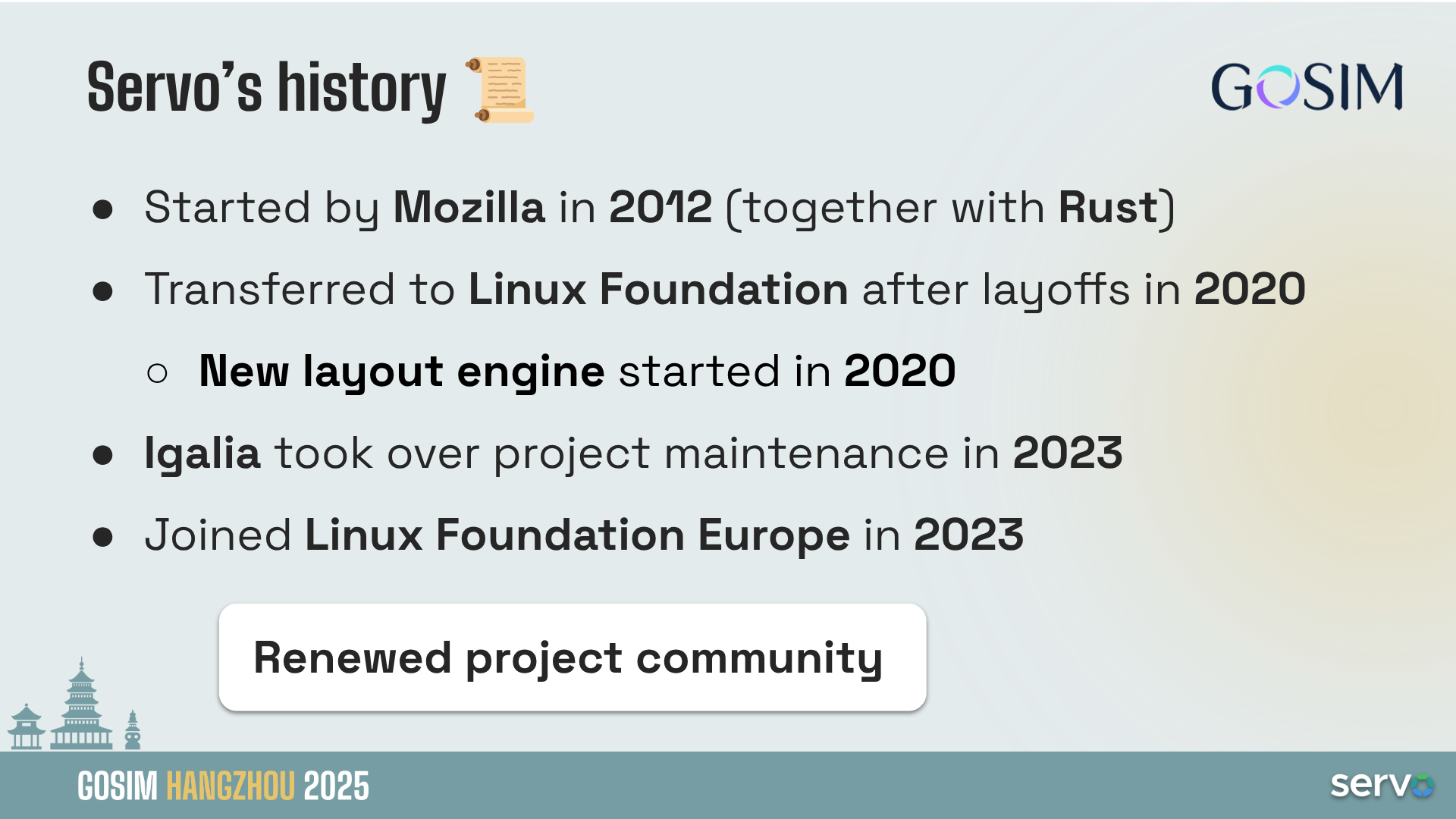
This is a brief summary of Servo’s project history. The project was started by Mozilla in 2012, at that time they were developing the Rust language itself (somehow Mozilla used Servo, a web rendering engine, as a testing project to check that Rust language was good enough). In any case we cannot consider it really “new”, but Servo is way younger than other web engines that started decades before.
In 2020, Mozilla layoff the whole Servo team, and transferred the project to Linux Foundation. That very same year the Servo team had started the work in a new layout engine. The layout engine is an important and complex part of a web engine, it’s the one that calculates the size and position of the different elements of the website. Servo was starting a new layout engine, closer to the specifications language and with similar principles to what other vendors were also doing (Blink with LayoutNG and WebKit with Layout Formatting Context). This was done due to problems in the design of the original layout engine, which prevented to implement properly some CSS features like floats. So, from the layout engine point of view, Servo is quite a “new” engine.
In 2023, Igalia took over Servo project maintenance, with the main goal to bring the project back to life after a couple of years with minimal activity. That very same year the project joined Linux Foundation Europe in an attempt to regain interest from a broader set of the industry.
A highlight is that the project community has been totally renewed and Servo’s activity these days is growing and growing.
The WPT scores should give an idea of how “ready” it is: https://servo.org/wpt/
It shows that the situation in 2023 was pretty bad, but today Servo is passing more than 1.7 million subtests (a 92.7% of the tests that we run, there are some tests skipped that we don’t count here).
It’s working on my end as well!
I got the test messages I exchanged with a friend earlier, but new messages are still stuck
Is Signal down for anyone else?
Reddit seems to be having issues as well. hah
Signal seems to be down as well?

 262·2 months ago
!world@lemmy.world has a rule against United States internal news, which is a nice balance for me, but it can still be dominated by news about ways that the US is affecting things around the world
 4·3 months ago
Neat
I wonder how Google (and the search engines that depend on Google) decide which person/entity to feature in the snippet. At what point would Lemmy the software replace Lemmy the person?
For example, “Swift” brings up the financial organization, while “Taylor” brings up Taylor Swift
In addition to downvoting, please report the post so that admins can take care of it.
Part of why we put this together is so that I could send it to people when I struggle to explain 😅
https://fedecan.ca/en/guide/get-started
https://fedecan.ca/en/guide/lemmy/for-users/detailed-overview
 1·3 months ago
I think if you don’t have an account with them, the only relevant bit is here
https://www.linkedin.com/help/linkedin/ask/TS-DPRO
If a LinkedIn account shared something with your information, you can file a request about it
I’m not sure which guides to recommend, but in case it helps narrow down your search, you could share more about your situation:
-
Do you have any existing hardware or are you planning to buy? If so, what is the budget for the equipment and where in the world are you approximately?
-
What did you want to self host? Some services would benefit from a certain type of setup. For example, if you’re serving lots of media, if you need redundancy and uptime, if you’re running AI models or something that needs a GPU
General tips:
- take lots of notes on your process. This will help you iteratively improve your setup. If it all falls apart, it will be easier to quickly get going again since you know what options you picked at each step.
- Make more posts here when you get stuck on something :)
For Linux, a lot of people go with Ubuntu server because there are a lot of existing guides for it. You don’t need much Linux knowledge to start self hosting since you can learn by doing over time. Some concepts to explore before getting started might be cron, the Linux file system, and user permissions.
For Docker, you should be fine if you know the basics. I’d recommend using Docker Compose since it’s easier to understand what’s happening when its written out in a nice yaml file. Install Docker and Docker Compose on the server, and then install something like DockGE to manage the compose files. When you want to run a service, copy the Docker compose file and then swap the port to what port you want to use, and the volume to the location you tend to use.
For a very basic setup, I’d find a video guide for
- installing Ubuntu server on the machine
- basic setup of the Ubuntu server (file permissions, docker, docker compose)
-
The opt out is specific to your account. If you don’t have an account, its less likely that you have information with them to delete












In Britain specifically: